ZIS / ZISEngine (Installation System Framework)
by Zipplet / Kotomi 2024-2025.
/!\ If you're reading this page because you hit an error message in an installer built with ZIS, see the FAQ at the end of this page /!\
I do not use AI / LLMs (e.g. CoPilot, ChatGPT) when developing my software, including ZIS.
What is ZIS?
ZIS (Zipplet Installation System) is an installation system and patch framework, a toolkit used to build software installers and patches. I've been developing it since 2024 - originally as the installer for KotomiPatch. However the project grew far beyond that after I was invited to join Team Noumi, one of the first things they asked for was an installer for their upcoming fan translation project. I pivoted the goal of the project and turned it into ZIS, a customisable installation system. ZISEngine can do the same job as other installers you've seen before, but it offers additional special features geared towards patch developers and fan translators whilst presenting a clean user interface.
An installer built with ZIS: (from patches.tsukimiya.moe)
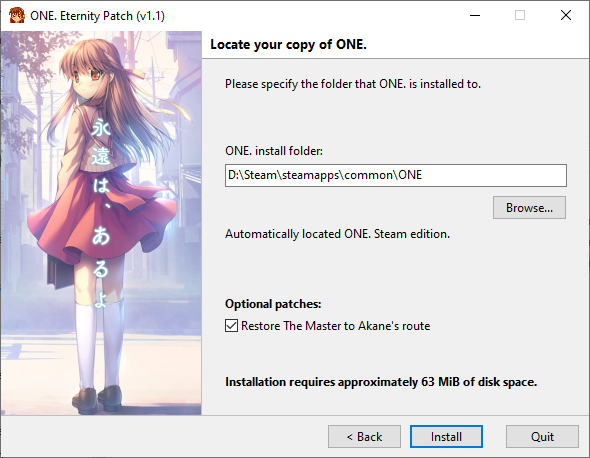
A strong goal of the project is to improve the end user experience when it comes to installing fan patches - some patches are difficult to install for the average user and importantly also make patches easy to remove or configure. By the way, even simple patches deserve a nice install GUI!
To achieve this goal, ZIS's installer engine will be extended with extra features behind-the-scenes to support complicated patch operations as necessary.
Whilst ZIS can be used to build an installer or patch for any program or game, I primarily target fan translation patches for visual novels currently - so special ZIS features are geared towards that right now (for example custom compression algorithms/optimisations for proprietary archive formats found in certain VN engines).
How does it differ from other installers?
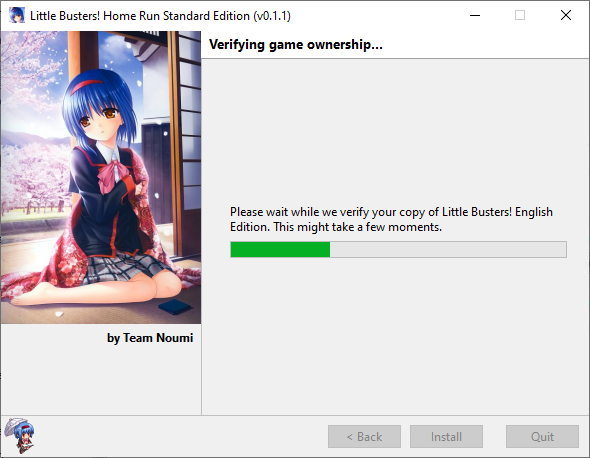
ZIS focuses on the end user experience - easy to use, easy on the eyes and fast whilst supporting advanced features for patch authors. ZIS's features can allow a patch to be a lot smaller than it would normally be if packaged as a simple archive or distributed with another installation system that does not specialise in patches for visual novel engines, although this depends on the exact content being packaged and the VN engine. This potentially reduces the burden of hosting the patches for fan translation groups. Advanced encryption is also supported for packages, a useful feature when combined with optional game ownership verification. This is a feature that some fan translation groups desire - enforce the end user to own the game they are downloading a patch for, so that we keep the copyright holders as happy as possible.
Game ownership verification in action, with a very early version of ZIS:
Some features and benefits:
- Officially tested on Windows 7 / 8 / 10 / 11. Windows XP support will be added soon
- Major builds are regularly tested on Steam Deck (with Proton).
- Installer engine is a native 32-bit executable for maximum compatibility with older systems.
- Built installers are a single EXE file for user simplicity.
- Assets are intelligently compressed using the most appropriate algorithm for each individual asset by the ZIS packager.
- HighDPI aware (but image scaling isn't perfect and will be improved in the next release).
- Lightweight installer engine.
- No other dependencies like the .NET framework or Windows Installer are required.
- All installer steps and pages are fully customiseable to suit the project. Graphics can be used to decorate the UI.
- ZIS does not write lots of temporary files during and after the installation unlike many other installation systems.
- Fast even when processing multi gigabyte installation packages.
- Integrity checks are performed to confirm the package is not corrupted.
- Able to validate that the correct edition of a game is being patched before installation proceeds.
- Able to support multiple different editions of a game and patch them in a different way as required (for advanced patches that support multiple game editions/versions) whilst maintaining a small package size as assets do not need to be duplicated unnecessarily.
- Optional game ownership verification - verify ownership of a legal copy of a game before patching will proceed.
- You can require ownership of a different game to the one you are patching (e.g. require ownership of AIR Steam Edition but allow patching AIR Regular Edition)
- Installers with game ownership verification enabled have a protected encryption key by design
- Currently only supported for Steam but will be extended to other platforms and optical media (+ more platforms if requested) in upcoming versions.
- Installer packages are tamper protected and encrypted.
- Multilingual installer packages can be created.
- English and Japanese are the main language targets but I can add others if I find someone to help me with localisation.
Many other features are in development for the next release and this list will be updated later.
Where has it been used?
Several patches and games have been released with the aid of ZIS. Some publically released patches and games:
- Team Noumi - Little Busters! Home Run Standard Edition (v0.1.1) - https://teamnoumi.org/ (not currently available for download)
- Tsukimiya - ONE. Eternity Patch - https://patches.tsukimiya.moe/one
- Tsukimiya - Harmonia Full Voice Patch - https://patches.tsukimiya.moe/harmonia
- eien - Stay. -Fragments of Memories- - https://eien.nl/stay-fragments-of-memories/
More information coming soon.
Can I use it to package my Visual Novel/patch/fan translation?

I appreciate your interest! I want the overall quality of patches to improve when it comes to the user experience (that's why I built ZIS) so I'd be happy to help if I can.
I can also help your team figure out how best to prepare your patch/translation for packaging and help you reduce the file size of your final patch by suggesting changes before the release stage. Extra features can be added to ZIS if necessary to support special requirements for your project. I can build a configuration tool (options screen)/launcher/etc for patches if they need them.
I am familiar with all aspects of the release process for projects of many sizes.
Any project I've agreed to help with, I will commit to maintaining releases (including new versions of a patch as necessary at reasonably short notice to the best of my ability).
Updated April 2025:
I am currently working with some groups/individuals to help build releases (including Team Noumi and my own project KotomiPatch), so I can't easily spare any more time to help other fanTL groups right now. However if you'd like to get in touch, please do and I'll see what I can do for your project/group. I usually go by the name Kotomi in VN spaces (on discord username zipplet - Zipplet/Kotomi).
For now I'll prioritise helping projects that benefit the most from ZIS features until the toolkit has matured a bit. I am currently improving the tooling to make it possible for me to spin up new releases with less effort as I want to help the community as much as I can.
The ZIS toolkit is not publically available, and there are currently no plans to make it available for others to use without my support. Due to the special features and the level of customisation available, it's a complicated toolkit to work with and I don't want my software (and thus name) used to package releases that I have no involvement with. I appreciate your kind understanding.
Linux support?
Current Windows builds of ZIS are occasionally tested on Linux, especially when a patch is built that works with a game on Steam Deck (thank you RyanTheArchivist for your help testing these!).
However, one group I work with has expressed interest in a native Linux GUI installer engine to package Linux games and patches. Depending on my time constraints I may build a native Linux GUI installer engine for ZIS at some point in the future.
Mac support?
There are no plans to produce a Mac OS version of ZIS. This is unlikely to change in the future.
User FAQ / issues
If you're reading this page, it's probably because you're trying to install/uninstall something that was packaged with ZIS and have run into some issues. Even though ZIS was used to package the program, it does not mean I'm responsible for the issue you're having. Please always read the instructions that come with the program/game/patch first, and then consider reaching out to the author of the game or patch you are trying to install.
However, I'll document some common issues below.
Quick list of known issues
- Steam games might not be auto detected especially if you have moved them from one Steam Library folder to another Steam Library folder on another drive.
- This is due to Steam not updating the Windows install database (registry keys) correctly. A fix will be added to ZIS soon (by v0.3).
- The installer will ask you to manually select the folder, so you can proceed.
- I have no idea how to report this issue to Steam support as it is a Steam bug… if you can help me contact them, please let me know!
- A graphical uninstaller is not supplied (instead an uninstall batch file is supplied). I'd like a nice GUI uninstaller!
- ZIS v0.3 will rectify this issue, and older patches will be rebuilt with the new engine in time.
I'm installing a program/patch and I see a ZISEngine Internal Error message?
An internal error:
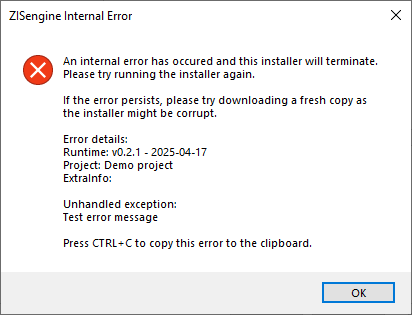
Internal errors should never be triggered as a rule; if this happens it could be a bug in ZIS or faulty RAM / unstable overclocking. Please try to install the program again. If the issue persists please reach out to the group responsible for the release for assistance - they'll work with me and I'll fix it if it is a ZIS bug.
I can't get past game ownership verification!
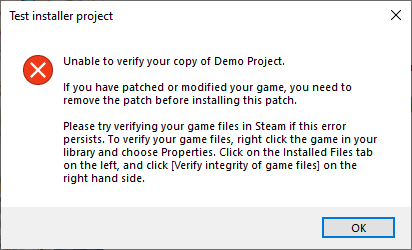
First, do you really own a copy of the original game? The ownership verification check for Steam games requires you to own the game on Steam. If the error persists, follow the instructions as directed to verify your game is not corrupted and make sure your game has not been patched as that can cause the check to fail.
Make sure your game has been updated to the current latest version available and that you have not opted into a beta build of the game.
If the error persists after all of this, perhaps the game has been updated by the developer and is no longer detected properly by the installer. Contact the team responsible for the patch for an update.